
ElderoakElderoak

For families caring for someone they love

One app. The whole family. On the same page.

Medications, appointments, and check-ins — shared across siblings, spouses, and trusted helpers without the group texts.

Android — coming soon

Free for caregiver + cared-for·From $9.99/mo for families·Cancel anytime
  • 14 languages, day-one
  • iPhone · iPad · Apple Watch
  • On-device first
  • No credit card to start

What it looks like in real life.

It's 8:13 PM.

Mom was supposed to take her evening blood-pressure pill at 8. You're 200 miles away and you don't want to call again — she's already feeling watched. Elderoak quietly notices, sends her a gentle reminder she taps from her recliner, and lets you know she's set for the night. No call needed.

It's a Tuesday morning.

Dad has a cardiology appointment. You can't take the day off, but your sister can. She opens Elderoak on her phone, sees the address, the doctor's name, the questions Dad wanted to ask, and a recording space for what the doctor says. By dinner, the whole family has heard it.

It's the Sunday before help arrives.

Mom's morning helper is going on vacation; someone new starts Monday. Through Elderoak, the new helper already has Mom's medication list, mobility notes, the time she usually wakes, and the breakfast she likes. Mom doesn't have to explain herself to a stranger.

Why not just a group text?

We tried the group-text route too. Here's what it kept missing.

Group textsShared spreadsheetElderoak
Who took her morning pills?Whoever texts back first guessesSpreadsheet — if anyone remembered to update itLogged automatically, visible to the family
When's the next cardiology appointment?Buried 200 messages backOn a tab no one opensShared calendar with reminders + driving notes
What did the doctor actually say?Recap from one sibling, half-rememberedNotes from whoever drove that dayVoice-noted at the visit, transcribed for everyone
Did help arrive today?Wait and wonderManual entry, often skippedHelper check-in pings the family automatically
Can Mom use it herself?Group texts can overwhelm herSpreadsheets need a laptopHer view shows only what's hers, in big type

What Elderoak does for your family.

Four jobs the app does in the background, so you don't keep doing them yourself.

Medications, on time

Schedule pills by time and dose. Quiet reminders on their phone or Apple Watch. Refills flagged before they run out. The whole family sees what was taken and what was missed — no one has to call to check.

Appointments, together

Add a doctor's visit once. Whoever can drive sees the address, the questions to ask, and a place to record what the doctor said. By dinner, everyone has heard it.

One family, one view

Brothers, sisters, spouses, neighbors — invite anyone who helps. Each person sees what fits their role. The work of keeping everyone in sync stops landing on one person.

Help, when it matters

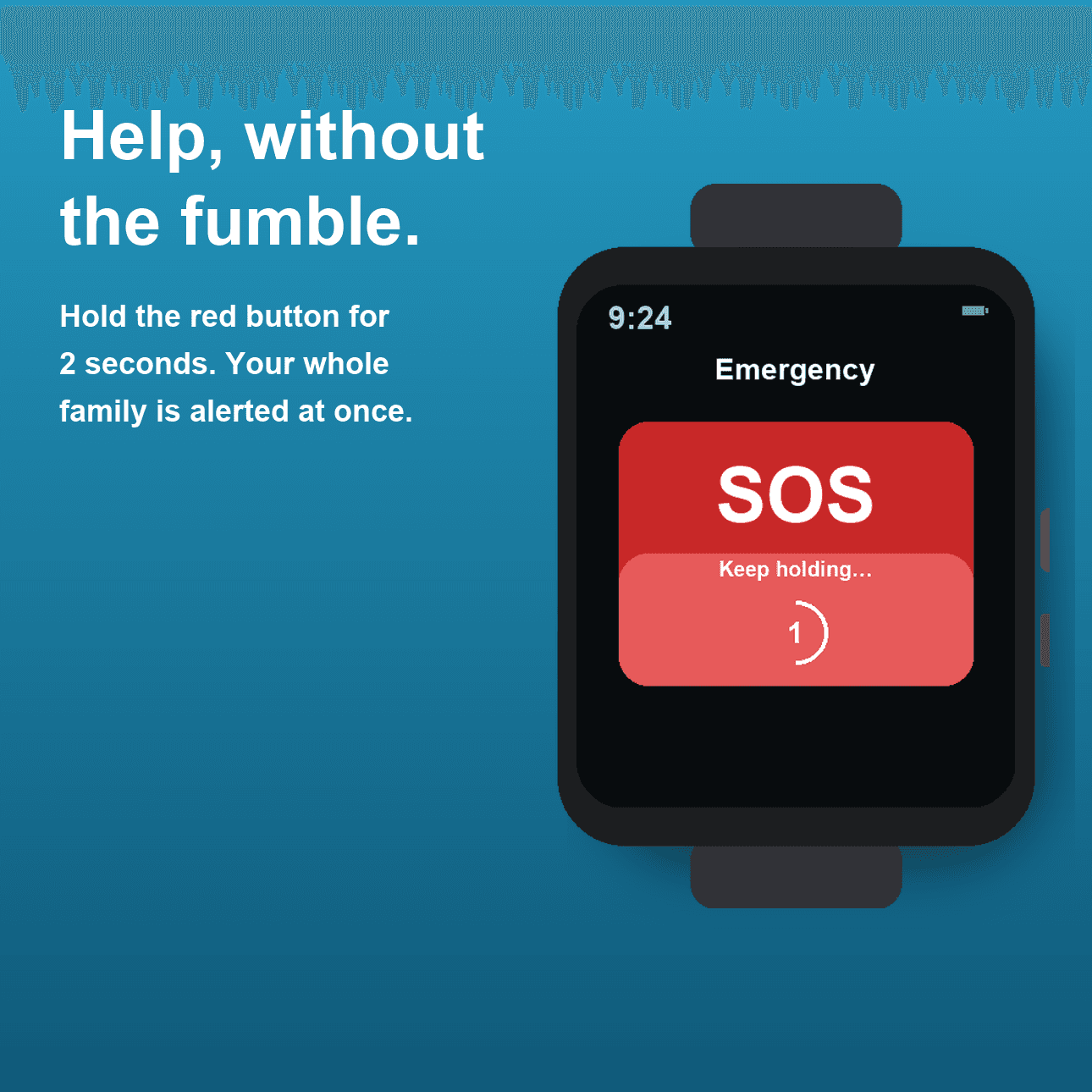
A red “Get help” button always reachable. Hold for two seconds — every assigned caregiver is notified at once, even through Do Not Disturb. On Apple Watch, fall detection covers the case where they can't press the button — the family is alerted anyway.

A different experience for each person.

Real screens from the app — not mockups. Each role sees what fits the way they help, with the depth (or simplicity) the job calls for.

If you're an adult child or spouse

The dashboard you've been trying to keep in your head.

All the moving parts — meds, refills, appointments, who's there today, what's already been done — laid out so you stop being the bottleneck on every family question.

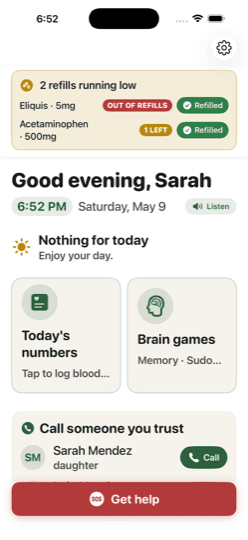
  • Today-at-a-glance for everyone you care for, with doses on track, refills running low, and what's coming next.
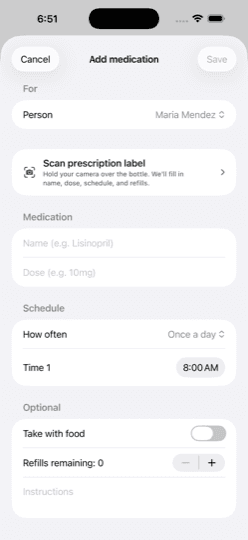
  • Add a medication by scanning the prescription label — name, dose, schedule, and refills filled in for you.
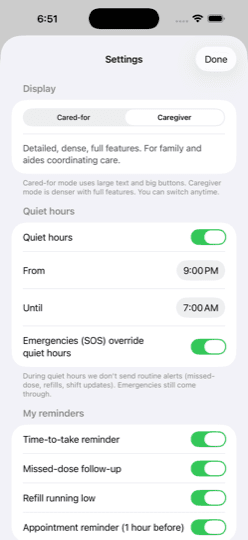
  • Quiet hours, missed-dose follow-ups, refill alerts — fine-tuned per family without bothering the person being cared for.
  • Calendar feed export so doctor visits and dose times sync into the family's existing iCal or Google Calendar.
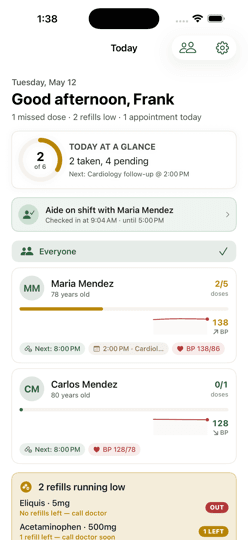
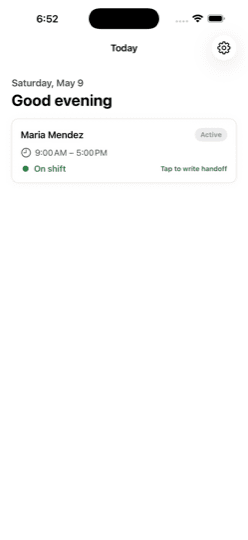
Adult-child home dashboard
The dashboard, end-of-day
Adding a medication by scanning the prescription label
Scan-the-label add
Reminder + quiet-hours settings
Reminders + quiet hours

If you're the one being cared for

Big buttons, plain words, your independence kept.

A simpler view of your day — what to take, how you're feeling, who to call. The family stays informed because you chose to share, not because anyone is looking over your shoulder.

  • “Did you take it?” prompts at the right time, with a one-tap “Yes” or “No” — no scrolling, no menus.
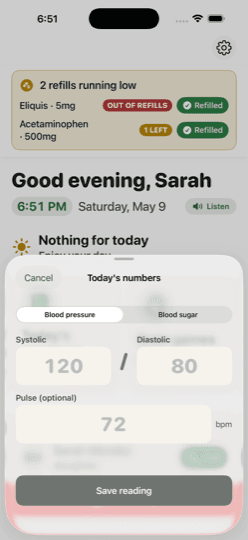
  • Log blood pressure, blood sugar, and pulse in seconds. Your numbers are saved and shared with the family who's paying attention.
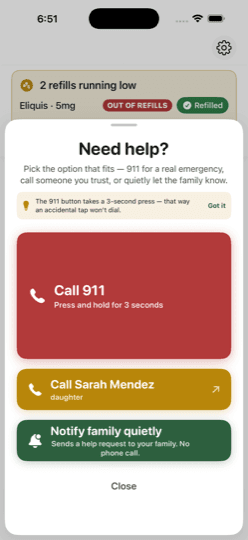
  • “Get help” at the bottom of every screen — call 911, call someone you trust, or quietly notify the family without making a phone call.
  • Daily wellness check-in, brain games, gentle streaks — built so the day feels lighter, not gamified.
Cared-for home with brain games and Get help button
Today, simply
Logging blood pressure and pulse
Today's numbers
Get-help sheet with three options
Three ways to ask

If you're a trusted helper

One screen. One visit. No clutter.

We deliberately kept the helper view small. See today's plan, do the work, write the handoff, leave. The family sees you were there.

  • Visible-to-the-family status when you've arrived and when you're done, with start and end times.
  • Tap once to log meds given, vitals taken, or notes for the next caregiver. Auto-shared with the family group.
  • Boundaries by design — you see only today's plan, never the family's broader records.
  • Voice-to-text handoff so the end-of-visit note is one minute, not ten.
Helper view with today's plan

On every screen in the family.

Elderoak runs on iPhone, iPad, and Apple Watch — and adapts to whichever surface is in front of you. The same family data, the same coordination, picked up where you left off.

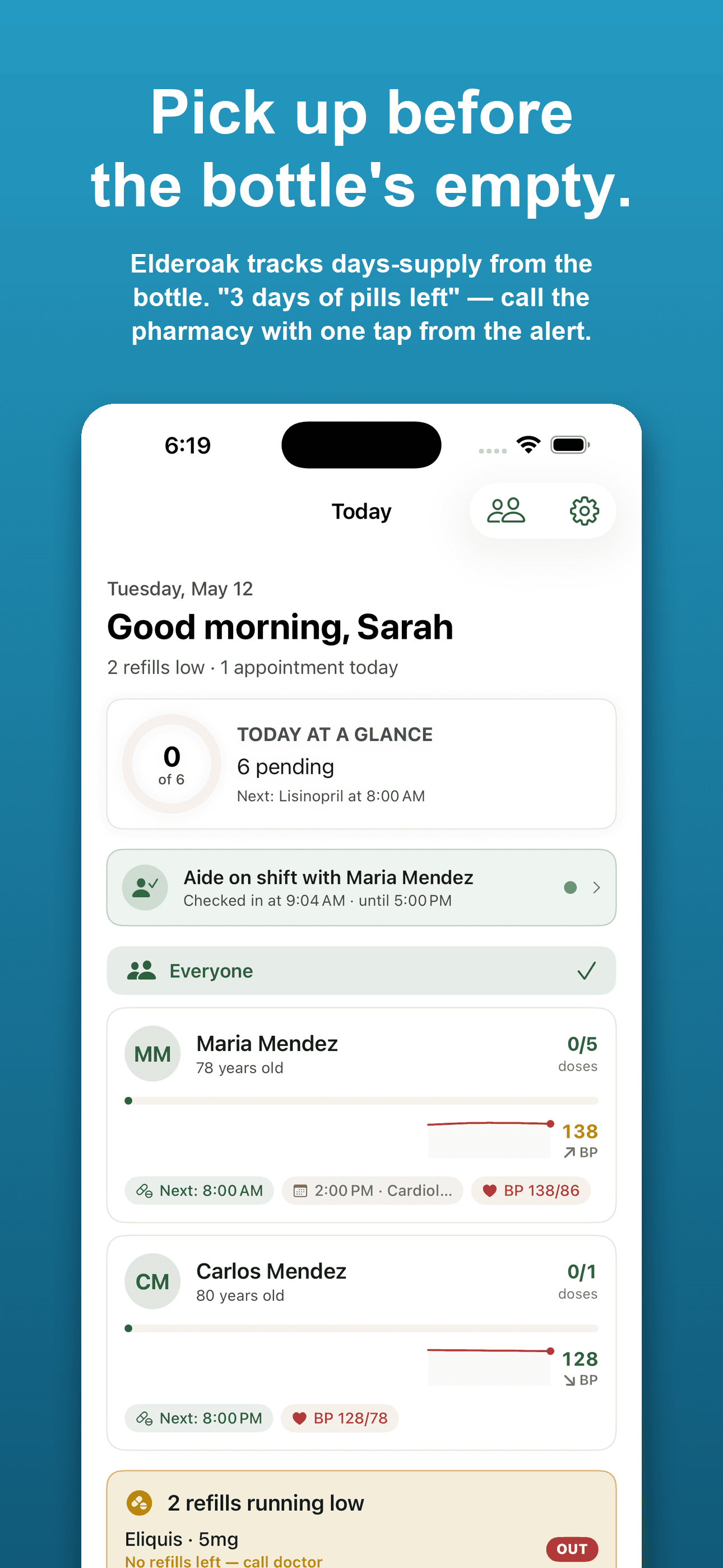
Pick up before the bottle's empty.

On iPhone

Pick up before the bottle's empty.

Elderoak tracks the days-supply printed on every prescription label. When seven days of pills are left, you get a Refill running low alert — with the pharmacy phone number one tap away. No more 11pm trips because the bottle ran empty.

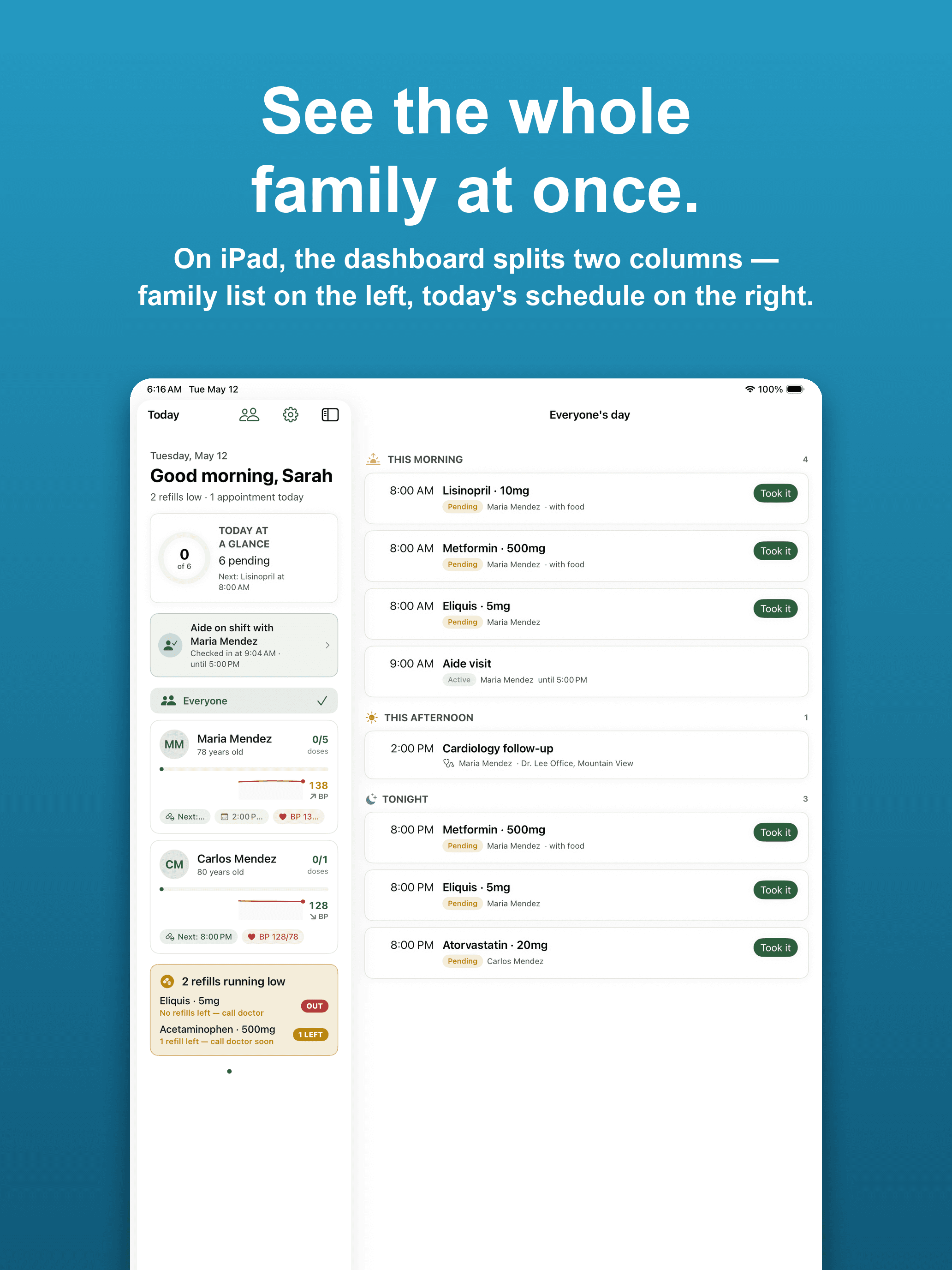
See the whole family at once.

On iPad

See the whole family at once.

Family caregivers coordinating across multiple parents get a two-column dashboard: family list on the left, today's schedule on the right. Tap a person — the timeline filters to their day without losing the rest of the family from view.

Help, on your wrist.

On Apple Watch

Help, on your wrist.

Confirm a dose, log a mood, or send SOS from the watch — without reaching for a phone. The red emergency button takes a 2-second hold so a pocket-press doesn't summon the family. And when Apple Watch detects a fall and they don't respond, the family is alerted too — on top of the emergency call Apple already places.

New · Apple Watch fall detection

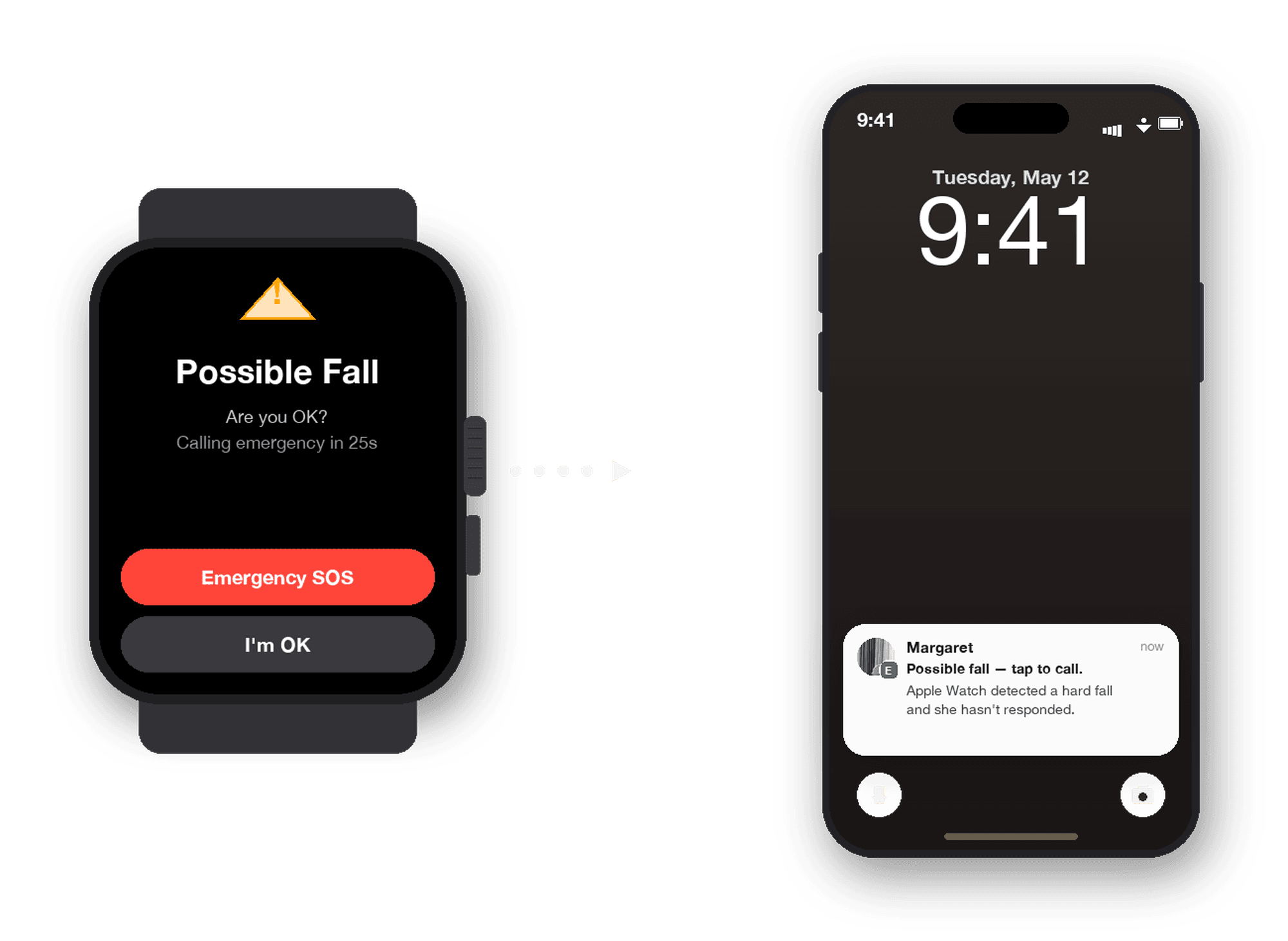
If she can't reach the SOS button, the watch reaches you.

Apple Watch detects falls. If your loved one doesn't respond to Apple's on-watch prompt, Elderoak relays a single notification to your family — best-effort delivery, supplementary to the emergency call Apple already places.

A complement to Apple's existing emergency-services flow — not a replacement.

Apple Watch showing the cared-for person's fall-detection prompt next to an iPhone displaying the Elderoak family-alert push notification

Apple Watch SE · Series 4+ · Ultra

How it works.

Five minutes to set up. Days of work it quietly handles after that.

  1. 1

    Add the person you're caring for

    Their name, a few medications, a couple of appointments. That's enough to start — you can keep adding as you go.

  2. 2

    Invite your family

    Send a link to siblings, your spouse, or the morning helper. They join with one tap and see what fits their role.

  3. 3

    Stay in sync without trying

    Reminders go out, doses get logged, doctor visits get shared. You stop being the only one who knows what's going on.

A short look around.

Twenty seconds across all three views — caregiver, cared-for, and helper — with the same family's data.

Honest pricing.

One free tier for the cared-for person. One Family tier for everyone helping.

Caregiver + cared-for

Free

For one caregiver and the person they care for. No card needed.

  • Includes 1 caregiver + 1 cared-for
  • Shared meds, appointments & reminders
  • iPhone today, Android coming soon
  • SOS button between the two of you
  • Offline-capable
Get started free
Most families

Family coordination

$9.99/moor $79.99/yr

30-day free trial. Cancel anytime.

  • Unlimited caregivers: siblings, spouses, trusted helpers
  • Family relay of Apple Watch fall events (best-effort)
  • Doctor-visit recording & sharing
  • iPad split-view dashboard
  • Shared calendar & med log
  • Helper check-in pings
Start 30-day free trial

Questions families ask us.

Is Elderoak HIPAA-compliant?+

Elderoak is a consumer app, not a Covered Entity or Business Associate under HIPAA. Health info you share with your family inside Elderoak is shared by your family, not placed with us by a healthcare provider — so it isn't PHI. If you're a clinician handling patient records on behalf of a practice, Elderoak is the wrong tool; you need a HIPAA-compliant EMR with a Business Associate Agreement.

What if my brother is on Android?+

Elderoak launches first on iPhone, iPad, and Apple Watch — Android is in development and coming soon. While we get the Android app to the same bar as iOS, Android family members can use the web dashboard at elderoak.app on any browser to see the family timeline, mark a dose as taken, and coordinate appointments. Apple Watch features (fall detection, dose-confirm, on-wrist SOS) will remain iOS-only for the foreseeable future.

What data leaves my phone?+

The minimum needed to sync the family group: scheduled medications, appointments, voice-note transcripts, and SOS events. Audio recordings of doctor visits are stored encrypted and only shared inside your family group. We do not sell data, run ads, or train models on what you upload. Detailed list lives in our privacy policy.

What happens if I cancel?+

Free tier (one caregiver + one cared-for) keeps working forever. If you cancel the Family tier, you keep access to your existing data through the end of your billing period; then the app drops back to free-tier features — extra caregivers lose access to real-time family updates, but the original duo's account keeps working. Nothing is deleted unless you delete it yourself.

Can my parent use this on their own?+

Yes — the cared-for role is designed to be used by the senior themselves. Larger type, fewer choices on screen, voice input where possible, and a one-tap SOS button. If they can't use it (vision, cognition, motivation), the family can run everything from their side and the cared-for never has to open the app.

Is the SOS button a replacement for 911?+

No. The SOS button and fall-detection family alerts notify your family group — they are a supplement to calling emergency services, not a replacement. The in-app SOS sheet, the watch fall-alert UX, and our Terms all carry this disclaimer. For any true emergency, call 911 (or your local equivalent) directly first.

A note from the team

We built Elderoak after watching our own families try to coordinate care for grandparents through group texts, spreadsheets, and a lot of guesswork. Every family ends up building this themselves — we just wanted to give you a gentler place to start.

When the time comes, we're ready to help.

Start with one person. Add the rest of your family at your own pace.

Need to talk to a person first? Email us.